

Key improvements
In the time since Cascade first launched, model capabilities have evolved significantly. Devin Local is built from the ground up to efficiently leverage these advancements.Token efficiency
The Devin Local agent is significantly more token-efficient, with a greater focus on prompt caching. Most tasks take up to 30% fewer tokens than Cascade to accomplish the same result.Subagents
The Devin Local agent can spawn independent subagents to handle subtasks — either in the foreground or background. Subagents share tools and codebase context with the parent agent but operate in their own conversation chain. Subagents are controlled by the Subagents (Preview) toggle inDevin Settings.
Beyond the built-in profiles, you can define your own subagents as markdown files under agents/ using either layout:
- Flat file —
agents/<name>.md, where the file name becomes the profile’s identifier. - Directory —
agents/<name>/AGENT.md, where the directory name becomes the profile’s identifier.
Sandboxing
The Devin Local agent supports OS-level sandboxing. When enabled, the sandbox enforces:- Filesystem isolation — writable paths are derived from your permission scopes, and
Read(...)deny rules hide paths from sandboxed commands - Network filtering — domain allowlists and denylists control what the agent can reach
Quick Review
Quick Review is a dedicated subagent available with the Devin Local agent to get rapid feedback on changes.Switching your agent
New tabs start with Devin Local when you haven’t chosen a preferred agent. If Devin Local isn’t available to you, the tab uses the first selectable ACP agent instead, and if no agent is available it shows the default new-tab UI and waits until one is. New conversations never start on Cascade, but your existing Cascade conversations remain available from the history and sidebar. You can change the agent for new conversations at any time via the agent selector in the bottom right corner of Devin Desktop — Devin Local is selectable even while it is still connecting.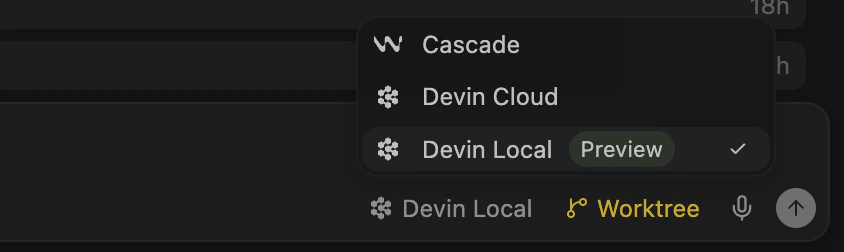
Agent settings
If Devin Local doesn’t appear in the agent selector, you might need to enable it fromDevin Settings:
- Open the Command Palette with
Cmd+Shift+P(macOS) orCtrl+Shift+P(Windows/Linux) - Open
Devin User Settings - Click the “Agents” tab
- Toggle the “Devin Local” agent on
- Restart Devin Desktop

Enterprise admins
Devin Local is a bundled agent that Devin Desktop fetches from the server. Whether it appears in the agent selector is controlled by the Devin Local Agent team setting:- On Team and other non-enterprise plans it is available by default (unless an individual member has this access disabled).
- On Enterprise plans it is gated, so an admin must turn it on for members.
- Devin Enterprise admins — Settings → Enterprise → Devin Desktop (
app.devin.ai/org/{orgName}/settings/desktop). Under Features, enable Devin Local Agent (“Allow members to use the Devin Local agent in Devin Desktop and delegate tasks to Devin’s terminal agent via ACP”). - Windsurf Enterprise admins — the Windsurf dashboard.
Modes
Devin Local has its own modes, separate from Cascade’s modes. Because it shares the agent harness with Devin CLI, it uses the same agent modes (Normal, Plan, and Ask) and the same permission modes. See essential commands for the full mode set and the slash commands that switch between them.Plan mode
Plan mode is read-only research: the agent investigates your codebase, writes up an approach, and asks for your approval before implementing anything. The plan is written to a persistent Markdown file at~/.devin/plans/plan-<session>.md, so you can edit it, come back to it later, or hand it to a fresh session.
Worktree sessions
You can run a Devin Local session inside a git worktree, so the agent can edit, build, and test without touching your main workspace. Pick the location from the agent location selector when starting a session:- New worktree — Devin Desktop creates a fresh worktree for the session.
- Existing worktree — choose one you already have from the selector’s Local submenu.
Worktrees are shared with Cascade sessions, including their on-disk location and cleanup behavior — see worktrees.
Customizations
The customizations surface lists everything a Devin Local session has loaded — rules, skills, hooks, MCP servers, and plugins — along with what your repository, organization, and account offer. You can open it with Open customizations from the new-tab menu in an agent space, or from the right-click menu on a Devin Local session in the agent sidebar.Restricted Mode
When a workspace is open in Restricted Mode, agents are unavailable in it: Cascade, Devin Local, and every ACP agent are disabled, and hooks neither load nor run. Agents become available again once the workspace is no longer in Restricted Mode.Differences
Permissions model
Devin Local replaces auto-execution levels with a more fine-grained permissions system to control which actions the agent can take:- Deny rules block actions entirely (highest priority)
- Ask rules always prompt for approval
- Allow rules auto-approve actions without prompting
Read(**/*.pem)) match against every workspace directory in the session, including directories added after it started.
Responding to permission requests
When the agent asks for approval, the request card offers a few ways to answer:- Edit the command — click the command in the card to change it before approving. The wand action lets you describe the change you want in plain language and has a fast model rewrite the command for you to review.
- Keyboard shortcuts — approve, always-allow, or reject a request without reaching for the mouse. The shortcut hints are shown on the buttons and dropdown entries.
- Session-wide grants — an approval you grant for the session applies to every later request in that session, so the root agent and its subagents don’t re-prompt for a scope you already granted.
MCP permissions
Unlike Cascade, the default configuration of the Devin Local agent prompts for approval before calling any MCP tool. When the agent wants to invoke an MCP tool, you can allow the specific tool or every tool on that MCP server, either for the current session or permanently.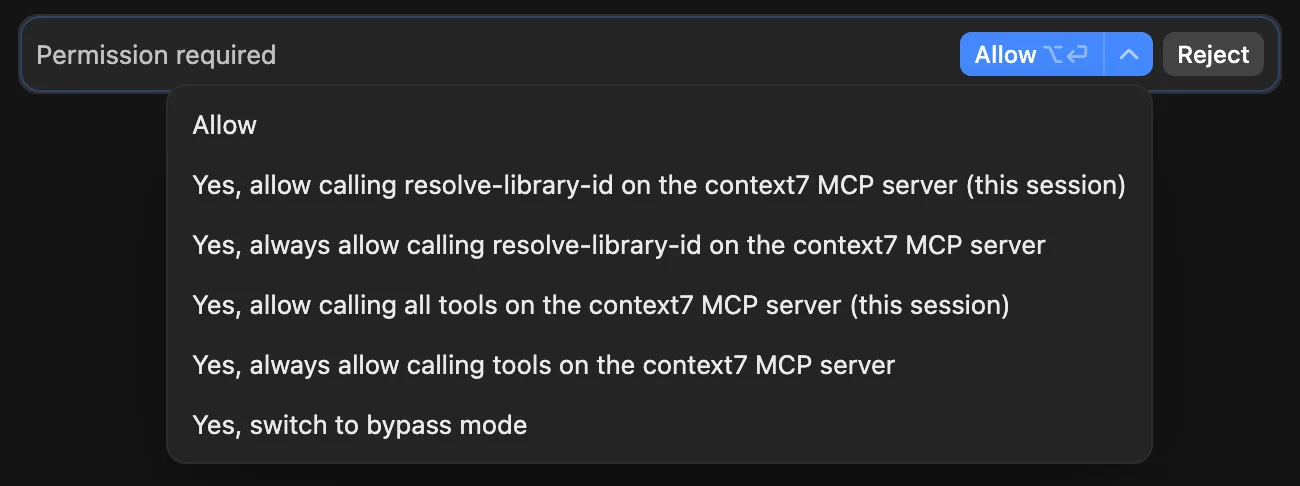
MCP re-authentication
When a server’s stored OAuth credentials expire, it shows a Needs auth state in the Devin Local MCP list, on its marketplace card, and on the server detail page. Click Authenticate to clear the stored credentials and re-run the browser authorization flow.MCP server configuration
With the Devin Local agent, MCP servers are configured via config files on your local machine. The file location is determined by the scope:Skills
Skills are reusable, model-invoked bundles of instructions (and optional scripts) that extend what the Devin Local agent can do. Because Devin Local shares the same agent harness as Devin CLI, it uses the same skills format and discovery mechanism. Skills are also the recommended way to migrate Cascade memories and workflows, which aren’t supported by the Devin Local agent (see Limitations) — capture a repeatable procedure once and the agent invokes it automatically when relevant. See the Devin CLI skills documentation for details on how to create, configure, and scope skills.Limitations
The gap runs both ways: plugins and subagents have no Cascade equivalent at all, and recent releases brought plan mode and merging worktree sessions to parity with Cascade. The list below covers the Cascade features this agent does not have yet. The following features are not currently supported with the Devin Local agent:- Memories — The Devin Local agent does not persist memories between sessions. Migrate your critical memories to skills with the Devin: Open Cascade Migration Wizard command.
- Workflows — Workflows are not available with the Devin Local agent. Migrate your workflows to skills with the Devin: Open Cascade Migration Wizard command.
- App Deploys - The Devin Local agent does not support app deploys.
- Arena Mode - Arena mode is not available with the Devin Local agent.
/share. The agent uploads a sanitized transcript (secrets redacted, system prompts and tool definitions dropped) and returns a link to share with your team. Sharing is only offered when your organization allows conversation sharing, you are signed in with a Devin account (not a Windsurf-only account), and the client supports sharing.
Analytics
Devin Local activity is reported in thecascade_runs data source (model usage, messages sent, and credit consumption), the cascade_tool_usage data source (per-tool call counts such as Code Edit, Run Command, Search Web, and MCP Tool), the cascade_lines data source (daily lines of code written by the agent), and the Cascade Data source of the Custom Analytics API.
Unlike Cascade, Devin Local does not track specific suggested lines or “modes” when operating: an edit only runs after you approve it, so accepted lines equal suggested lines, and the mode field in cascade_runs is not populated.
The Devin CLI does not report analytics for hybrid deployments.
Enterprise controls
Enterprise admins can configure the Devin Local agent through team settings, including new controls only available with the Devin Local agent:- Sandbox enforcement - Require sandbox mode for all users and configure organization-wide domain filtering rules
- Granular permissions - Control which actions the agent can take with more fine-grained permissions
- Network enforcement - Control network access with allowed and denied domains
/share.
Additionally, the “Enable Cascade” control can be used to disable the legacy Cascade agent entirely to ensure your team follows the new controls available with Devin CLI.
Unsupported enterprise controls
The following legacy enterprise controls are not available with the Devin Local agent:- Restrict Tool Calls to Workspace - by default, the Devin Local agent can only read/edit files within the workspace. Custom permissions are a more flexible replacement that can be used to replicate the same rules.
- App Deploys - App deploys are not yet supported with the Devin Local agent.
- Global tool calling disabled - If you previously disabled tool calling entirely, write an equivalent permission policy for Devin CLI instead.
- Auto Run Terminal Commands - The Devin Local agent uses its own permissions model instead of auto-execution levels; we recommend using this instead, but the old control will still be enforced as a fallback.
- Terminal allow lists - Implement an equivalent permission policy for Devin CLI to allow specific terminal commands.
- Terminal deny lists - Implement an equivalent permission policy for Devin CLI to deny specific terminal commands.